TurboPi Robot Car: Read This Before You Buy
The Real Talk Intro & Quick Verdict
A lot of robotics kits look impressive on product pages. Then you buy one, spend three hours tightening tiny screws, fight with WiFi setup, and end up with a robot that follows a line for five minutes before it gets pushed onto a shelf.
That’s the frustration many buyers are trying to avoid when they start looking at AI-powered robotics kits. Especially now, when products throw around terms like “AI,” “ChatGPT,” “vision tracking,” and “autonomous driving” without explaining what those features actually mean in real-world use.
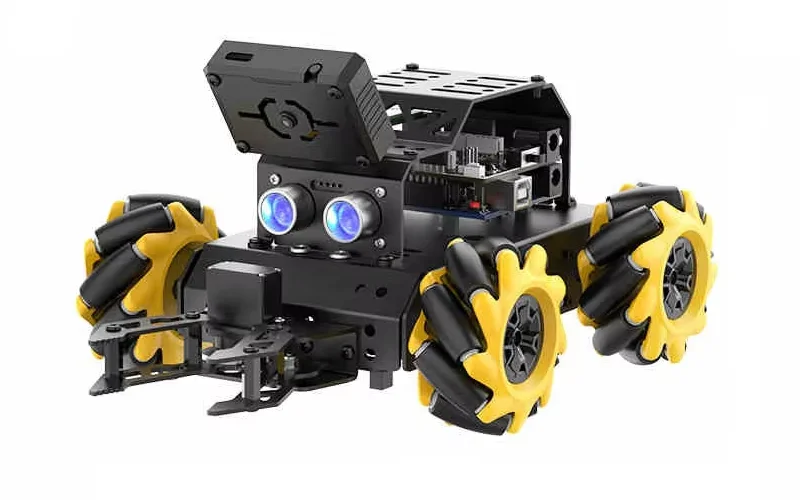
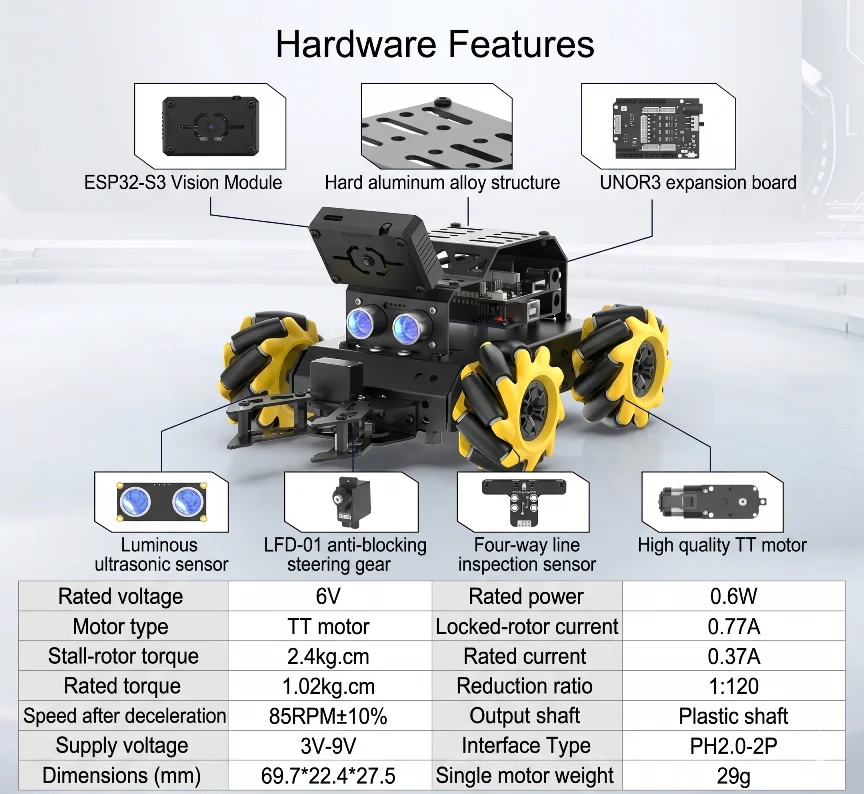
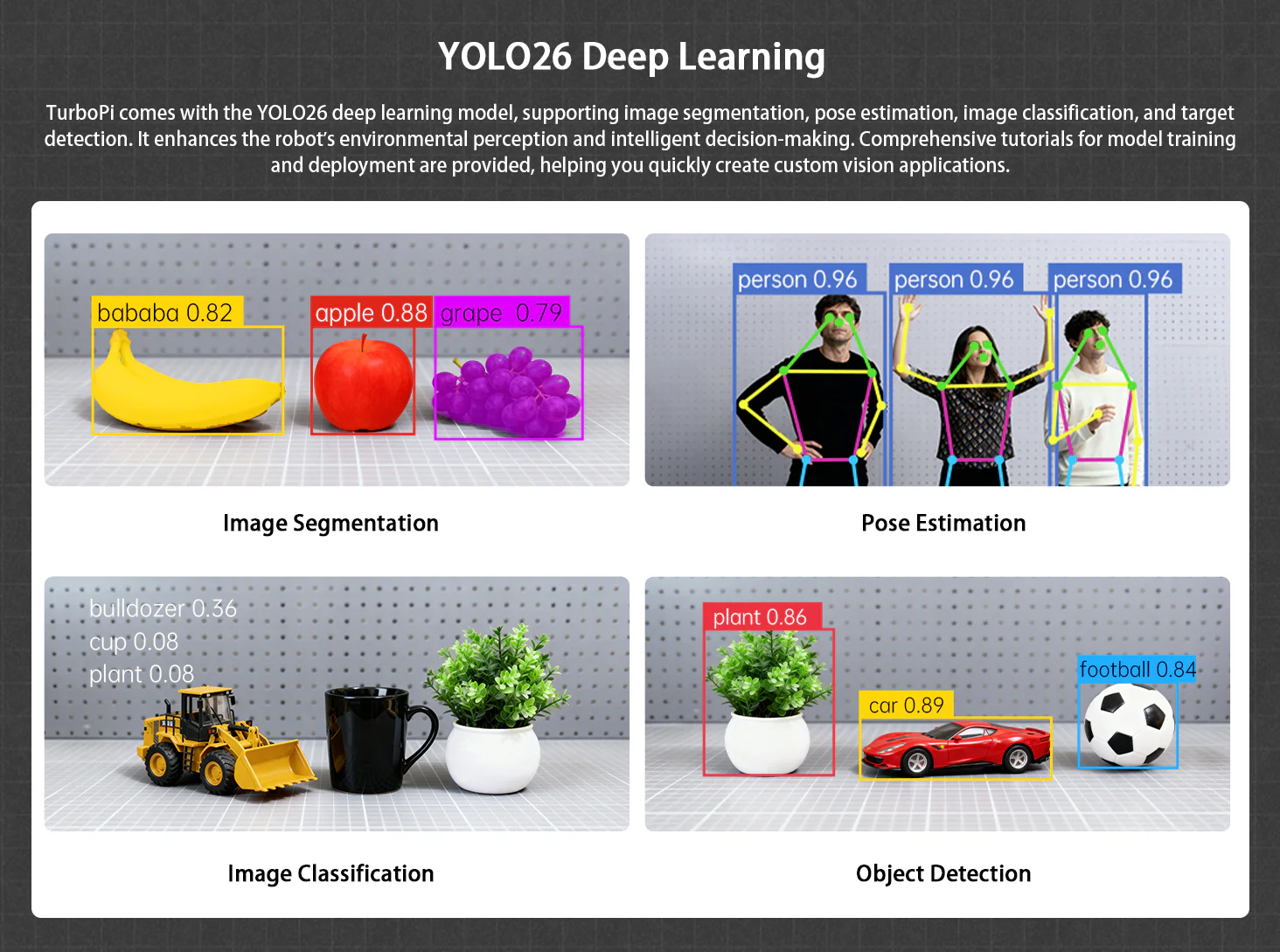
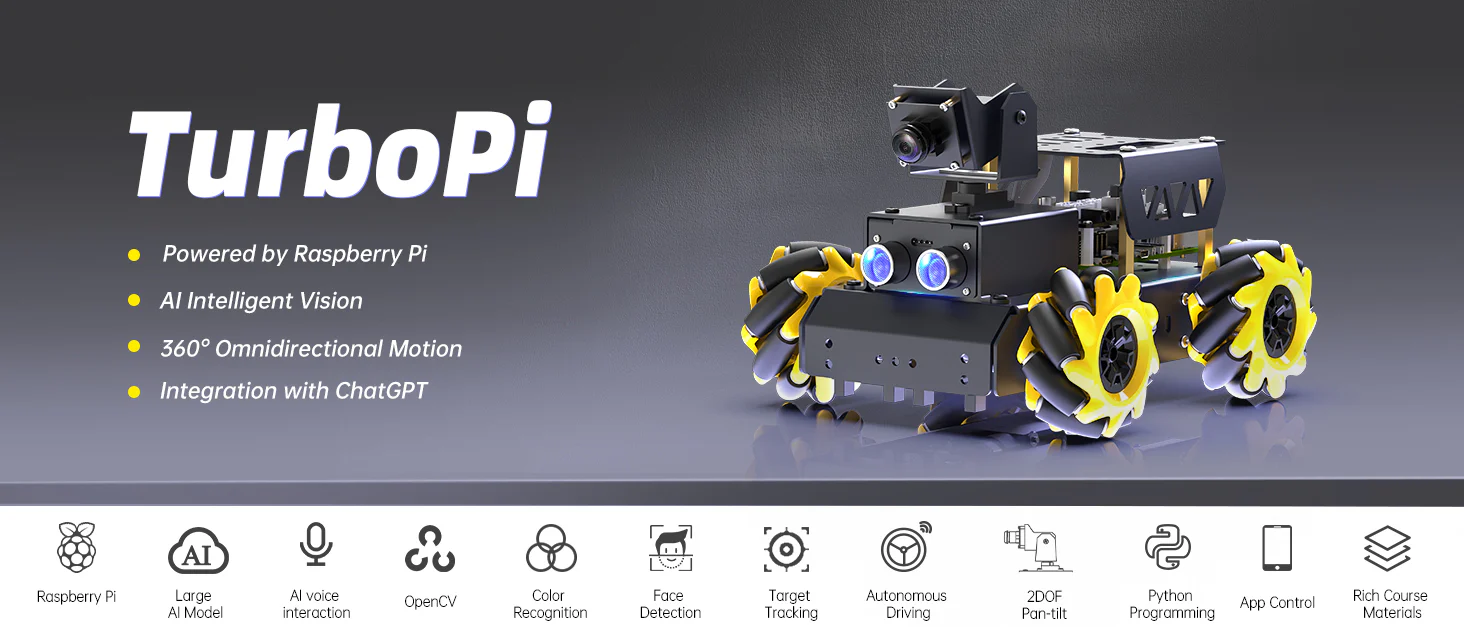
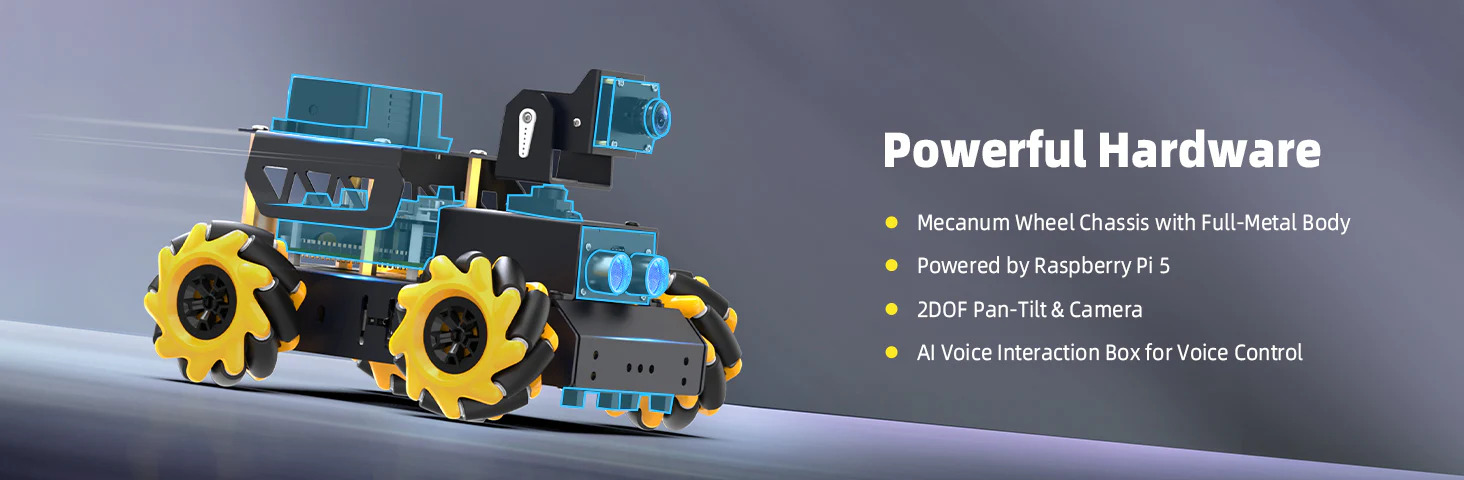
The Hiwonder TurboPi Raspberry Pi Robot Car ROS2 with Mecanum Wheels stands out because it’s trying to be more than a toy. It’s built around Raspberry Pi, ROS2, OpenCV, YOLO-based object detection, and mecanum wheel movement. That immediately puts it closer to an educational robotics platform than a casual beginner gadget.
But after digging through dozens of customer reviews, setup discussions, support conversations, demo videos, and user complaints, one thing became clear: this product is excellent for the right person and frustrating for the wrong one.
Quick Summary
Verdict: One of the more capable Raspberry Pi robotics kits for AI and ROS2 learning, but definitely not plug-and-play.
Best For: Students learning robotics and computer vision, Raspberry Pi enthusiasts, Intermediate makers and coders, Parents building STEM projects with older kids, ROS2 and OpenCV learners
Not Ideal For: People expecting a simple toy, Buyers uncomfortable with troubleshooting, Users wanting instant setup without coding
Affiliate Disclosure (Note: Prices are not mentioned here as they may change — refer to the affiliate links for updated deals. No additional cost to you.)
Why We Researched This Product
We looked into this robot because AI robotics kits are becoming crowded with exaggerated marketing. Every brand claims “AI-powered” now. But very few explain whether the product can actually help someone learn robotics, programming, or computer vision in a meaningful way.
So we went through user experiences from hobbyists, parents, STEM learners, and experienced robotics builders. We focused heavily on long-term ownership feedback instead of first-day excitement. That matters because robotics kits often feel great during unboxing and much less exciting once configuration problems start appearing.
The good news is that TurboPi has a surprisingly strong educational foundation. The less-good news is that some buyers underestimate how much patience a robotics platform like this still requires.
Use-Case Breakdown: Who Wins and Who Loses?
1. The Student Learning AI and Robotics
This is probably the strongest use case for TurboPi.
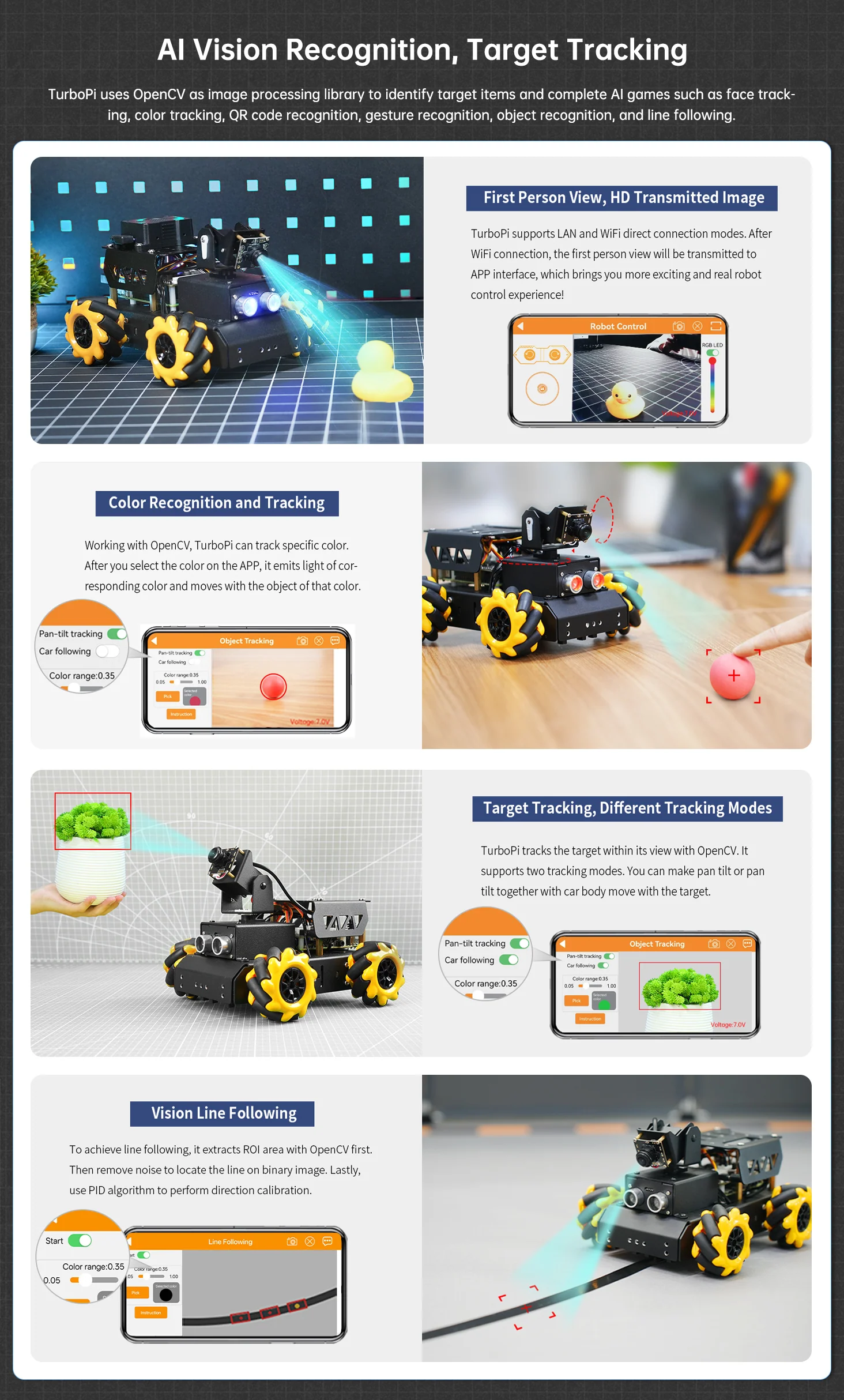
Imagine a high school or university student learning Python, ROS2, OpenCV, or machine vision. Instead of watching tutorials endlessly, they now have a moving platform with real sensors, object tracking, line following, ultrasonic obstacle avoidance, and AI interaction.
That changes learning from “theory” into actual experimentation.
A student can spend one day learning line following, then move into YOLO object detection, then start experimenting with voice interaction and semantic control. The fact that the system is open-source matters because students can inspect and modify code instead of being trapped inside a closed ecosystem.
The downside? Beginners may hit setup frustration quickly if they’ve never touched Raspberry Pi before.
2. The Hobbyist Maker
For makers, TurboPi is far more interesting than standard robot kits.
The mecanum wheels alone make it feel more advanced because the robot can move sideways, diagonally, and rotate in place. That immediately creates smoother movement for AI experiments and FPV control.
Makers who enjoy modifying projects will appreciate:
- ROS2 support
- Expandable hardware
- OpenCV integration
- Camera control
- Python-based customization
This is the type of kit where you start with object tracking and eventually end up building your own AI patrol bot or home automation experiment.
But hobbyists expecting perfect documentation may get annoyed. Multiple users mentioned translation issues and unclear assembly visuals.
3. The Parent Buying for a Teen
This category is tricky.
If the teenager already likes coding, robotics, or Raspberry Pi projects, TurboPi can become an incredible learning experience. Several reviewers specifically mentioned building it with their kids and enjoying the process together.
But if the child expects instant entertainment like a remote-control toy, this probably won’t end well.
Assembly takes time. Configuration takes patience. Troubleshooting may happen. Parents should view this more like a robotics workshop than a casual gadget.
The Gift Giver Section
As a gift, TurboPi depends entirely on the recipient.
For someone already interested in coding, engineering, or robotics, it’s a thoughtful and genuinely exciting gift.
For someone who dislikes setup and troubleshooting, it may accidentally become a stressful weekend project.
The safest buyers are people gifting this to:
- Engineering learners
- STEM students
- Raspberry Pi enthusiasts
- Robotics hobbyists
Features vs. Reality — The Truth Table
Marketing Claim | Reality After Research |
|---|---|
AI-powered robotics | The AI features are real, but setup and learning are required |
ChatGPT/Gemini integration | Voice interaction works, but advanced functionality still needs configuration |
Easy for beginners | Beginner-friendly compared to raw robotics development, but not beginner-easy |
Autonomous driving | Works through line following and obstacle avoidance, not self-driving-car intelligence |
Open-source platform | Huge advantage for learning and customization |
ROS2 support | Strong selling point for robotics education |
Omnidirectional movement | One of the most consistently praised features |
Plug-and-play robotics | Not really — expect assembly and software setup |
Performance & Long-Term Reliability
The first week with TurboPi usually follows one of two paths.
Path one: the buyer enjoys assembly, learns the software environment, and starts experimenting with robotics features successfully.
Path two: the buyer expects a fast setup experience and becomes frustrated with configuration issues.
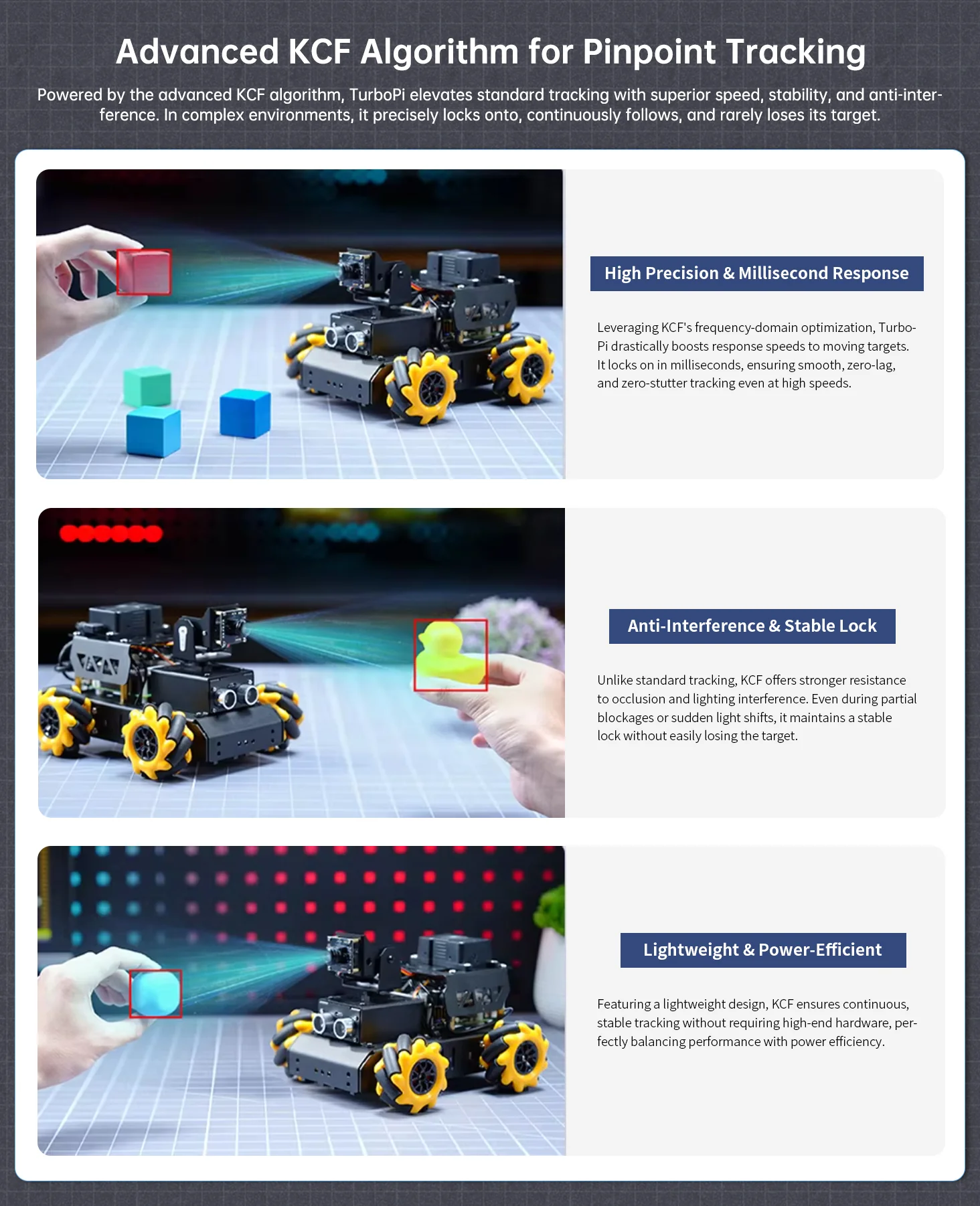
The actual robotics performance is surprisingly capable for the price category. Object tracking works well under decent lighting conditions. Line following is accurate thanks to the 4-channel infrared tracking system. Obstacle avoidance also performs reliably enough for educational robotics demonstrations. The biggest strength is flexibility.
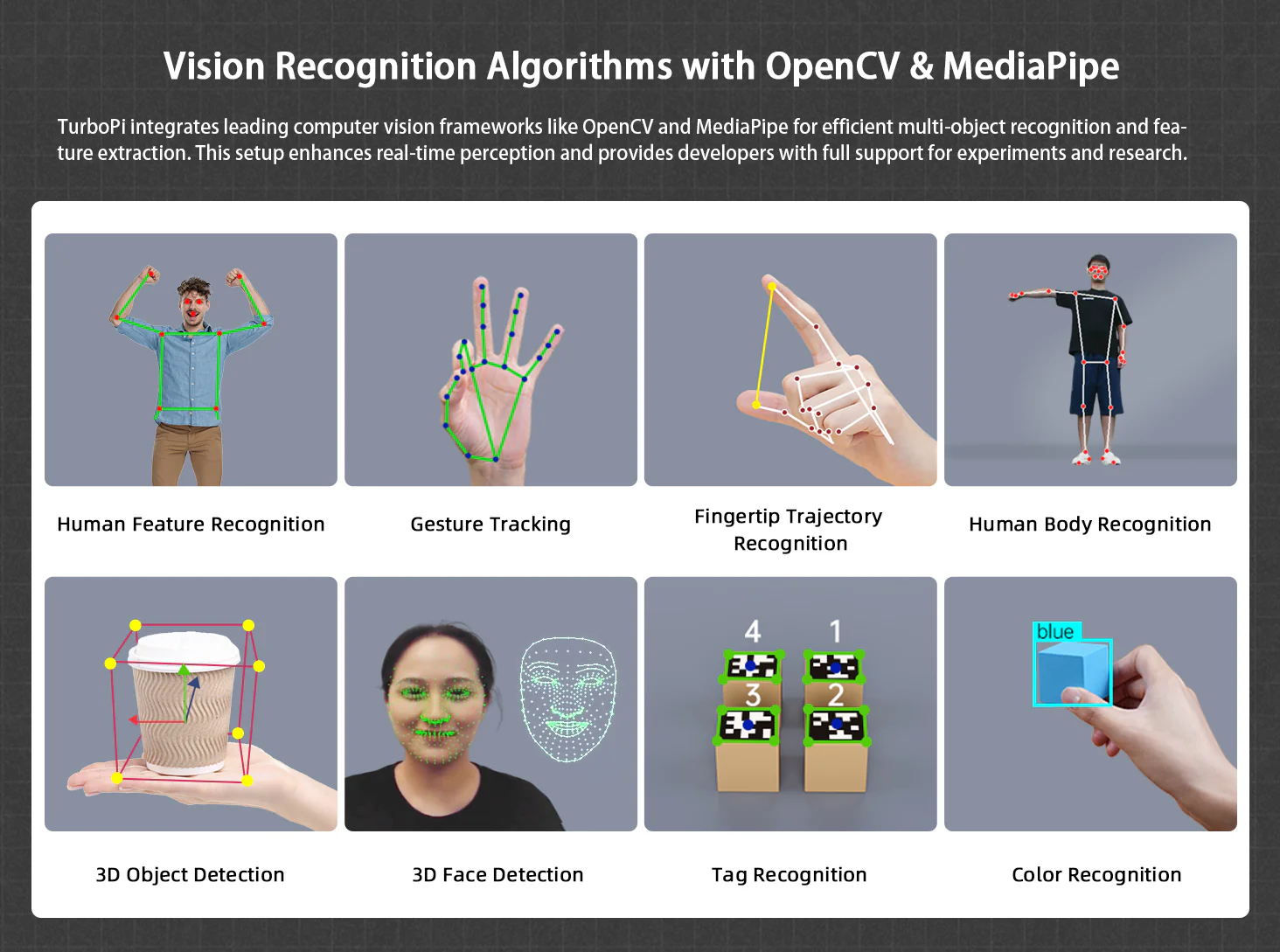
TurboPi isn’t limited to one predefined function. Users can explore:
- AI vision
- ROS2 projects
- Python automation
- FPV robotics
- Voice interaction
- Autonomous navigation
- Gesture recognition
That flexibility gives the platform much longer lifespan than simpler STEM toys.
Troubleshooting Section
If WiFi Connection Fails
Several reviewers struggled with WiFi pairing. Re-imaging the SD card or carefully repeating the app setup process often solved the issue.
If Object Detection Stops Working
One reviewer specifically mentioned camera feed issues during object detection mode. Restarting the system or reinstalling the image sometimes helped, although not always.
If Setup Feels Confusing
Watch supplemental YouTube tutorials instead of relying only on printed instructions.
If the Robot Feels Unresponsive
Double-check cable orientation and power connections. Several assembly mistakes come from partially seated connectors.
The Good, The Bad, & The Ugly
✅ Pros
- Excellent ROS2 learning platform
- Real AI vision and object tracking features
- Mecanum wheels create genuinely fun movement
- Open-source flexibility is a huge advantage
- Strong educational value for STEM learners
- Good hardware quality for the price range
❌ Cons
- Assembly instructions need improvement
- Not truly beginner plug-and-play
- Some users reported WiFi connection frustration
- Setup may overwhelm casual buyers
- Tiny hardware parts can be frustrating
- Advanced features require technical learning
⚠️ Researcher’s Note
If you buy TurboPi expecting a toy, you’ll probably feel frustrated.
If you buy it expecting a robotics learning platform that requires experimentation and patience, you’ll likely enjoy it much more.
Frequently Asked Questions (FAQs)
Q1. Can i run my own code based on ros2 humble on this robot?
Yes sure. The advanced kit with raspberry pi 5 supports ROS2!
Q2. I brought TurboPi Raspberry Pi 4B edition ,how do I get latest image & source code?
Please share your order number to support@hiwonder.com, and support team will provide you with the system image and source code.
Q3. If I buy Raspberry Pi separately, will I still get the code? And if yes is the code adjustable?
Yes, please feel free to contact us at support@hiwonder.com and provide your order number for assistance
Q4. What is the field of view of the camera on Turbo Pi?
The field of view of the camera is 130 degrees.
Q5. Is it possible to add a USB microphone and speaker?
Yes. However, TurboPi does not come with the necessary programs pre-installed. You will need to write a program to enable the integration of TurboPi with the USB microphone and speaker.
Q6. Is it possible to get access to the code library before receiving the robot kit? (Working on purchasing it, just want to know if we can get the code before the physical robot)?
The source code will be provided after your purchase. We appreciate your understanding. Thank you!
Q7. Is return policy of the product is available? What is the surety of getting the code?
Please share your order number to Support, and support team will send you the link for source code. Thank you!
Q8. What is the maximum speed?
The maximum speed is 0.3m/s; And the speed can be adjustable. To get the detailed instruction, please refer to: Mecanum Wheel Car Basic Lesson
Q9. Can you please give instructions for what software to put on the Raspberry pi (SD card)? We are not able to connect it with the app.
Please check this link.
Q10. I bought the LewanSoul AI Vision Raspberry Pi Robot Car Kit, but evidently, I needed to order some parts separately to function. Do I need a separate Pi board? A separate battery?
Please share your order number to Support with the details.
Q11. without Raspberry Pi what functions are available, can do FPV and Target tracking?
It cannot work without Raspberry Pi.
Q11. Where to get the tutorials or documentation?
Please follow the link.
Final Thoughts
The Hiwonder TurboPi Raspberry Pi Robot Car ROS2 with Mecanum Wheels is one of those products that becomes more impressive the deeper you go into it.
At first glance, it looks like another STEM robot kit with flashy AI marketing. But underneath that marketing is a genuinely capable robotics platform with meaningful educational value.
The ROS2 support matters. The OpenCV integration matters. The mecanum movement matters. These are real robotics concepts that users can actually learn from.
But TurboPi also demands patience.
This isn’t the kind of gadget you casually unbox and fully master in an hour. There will probably be setup frustrations. There may be troubleshooting. Some documentation improvements are definitely needed.
Still, for students, makers, robotics learners, and Raspberry Pi enthusiasts, TurboPi offers far more depth than most educational robot kits in this price category.
If you enjoy building and experimenting, there’s a good chance you’ll spend months exploring what this robot can do.